HOLO HELE
Helping Oʻahu Riders Navigate the Transit System
Project Overview
Holo Hele is a redesign of Oʻahu’s former transit app, DaBus2, to help riders plan unfamiliar trips, find the correct stop, and navigate service changes without losing the simplicity they valued for routine trips.
Project Type
Personal Project
Contributions
Brand Identity
UX Research
UX/UI Design
Functional Prototyping
Timeline
3 months
Tools
Figma
Codex
DISCOVERY
I had been checking the wrong stop for nearly a year…
SOLUTION
A transit experience built for familiar routines and unfamiliar journeys
Holo Hele is designed around three rider needs while preserving quick access to familiar trips:
A simpler way to search and plan trips
Clearer stop, route, and direction guidance
More timely information about delays and service changes
All-in-one search


Riders had to choose between multiple search methods and could not search by destination.


One search field accepts multiple input types and provides autocomplete suggestions.
Find and identify nearby stops

Tapping a stop revealed limited information. Stop icons were crowded, and riders had little information about bus direction or how to reach the stop.

Tapping a stop now shows routes served, upcoming arrivals, bus direction, and directions to the stop.
Stop icons are less crowded.
Follow the complete journey

Riders had to use another app to plan unfamiliar trips and understand where to walk, transfer, or get off.

The initial concept connected walking, waiting, riding, and transferring. The prototype later focused on walk–bus–walk guidance.
Clearer route guidance

Riders had to manually select stops on a crowded route map.

Route direction (A → B), upcoming stops, and scheduled arrivals appear together in one view.
In-app service alerts

Service disruption information was available on the website, but not within the app.

In-app service alerts explain disruptions and how they may affect a rider’s trip.
INITIAL OBSERVATION
Riders lacked the context to navigate confidently
An audit of DaBus2’s core flows surfaced five recurring gaps:
Fragmented search: Separate search methods, and no way to search by destination.
Cluttered map: Stop icons crowded together; tapping a stop revealed little.
Missing direction context: Nearby stops on the same route were hard to tell apart.
No trip planning: Riders had to leave the app to plan an unfamiliar journey.
Stale information: Arrival estimates could sit unchanged until the rider manually refreshed, then jump suddenly. Service disruptions were only published on the website.


RESEARCH
Validating the audit through rider feedback
To see whether the issues I found reflected broader rider needs, I combined public feedback with first-hand research.
20+ archived app reviews
coded for recurring problems, requests, and positive feedback.
6 Reddit threads
(100+ relevant posts and comments), for app preferences and workarounds.
6 interviews
with student riders about trip planning, arrivals, and daily commuting.
INSIGHTS
DaBus2 became ineffective when riders did not already know which stop to use
Across all three sources, riders valued DaBus2 for its simplicity when checking familiar stops, schedules, and arrivals. But when they did not already know which stop or route to take, the app offered no way to search by destination or plan a full journey.
Late or missing buses were another major frustration. Arrival data did not always refresh automatically, so riders could unknowingly view an outdated estimate until manually reloading the app. Once refreshed, the arrival time could appear to suddenly jump. Buses could also disappear from live tracking without a clear explanation.
In order to synthesize my research, I manually coded the app reviews and interview notes. Because the six Reddit threads contained over 100 relevant posts and comments, I used ChatGPT to organize and code that larger dataset. I then reviewed the proposed themes and supporting comments, corrected inaccurate groupings, and finalized the findings and statistics.
In short, familiar trips were fast. Unfamiliar trips required another app, while late or missing buses left riders uncertain about what was happening.
63% OF APP REVIEWS
mentioned inconsistent arrival estimates, GPS tracking issues, or buses disappearing from the app.
41% OF REDDIT POSTS
mentioned using another app to plan routes or find stops before opening DaBus2.
4 OF 6 INTERVIEWEES
used Favorites or wanted better organization for repeat trips.
18% OF REDDIT POSTS
mentioned difficulty identifying the correct stop or direction.
5 OF 6 INTERVIEWEES
reported difficulty planning a trip or searching by destination.
11% OF APP REVIEWS
requested notifications for delays or service changes.
Percentages and counts reflect coded entries within each research source. Themes may overlap.
COMPETITIVE ANALYSIS
Riders were already stitching together several apps
To understand how other transit apps handled the needs DaBus2 did not, I compared DaBus2 with the products riders said they used alongside it.

Search and plan by destination
Compare complete route options
Arrival, service, and get-off alerts
No search by stop number
Nearby stops were not visible without starting a search
Less efficient for repeatedly checking familiar stops


Search by stop number
Fast access to saved and familiar stops
Access to official live bus data
Bus schedules available
Free and ad-free
No destination-based trip planning
Nearby stops lacked clear directional context
Arrival times did not always refresh automatically

Compare route options across transit modes
Nearby route and stop discovery
Receive navigation guidance and notifications
No direct search by stop number
Some features were restricted behind a paywall
Interface could feel confusing to some riders

Complete destination-based trip planning
Arrival, service, and get-off alerts
Nearby stops and routes visible from the map
Dense interface with many features and prompts
Some enhancements require Moovit+
Frequent ads
HOW MIGHT WE…
Riders needed more support when planning unfamiliar trips, finding the correct stop, and responding to delays or service changes. They also needed arrival information that updated consistently, without losing the speed and simplicity DaBus2 offered for familiar trips.
PRIORITIZATION
Preserving DaBus2’s strengths while avoiding feature creep
Research surfaced more opportunities than the initial concept could reasonably support. I prioritized features based on how directly they addressed core rider needs.
Must Have
Essential to the rider journey
Search by destination, landmark, route, headsign, or stop number
Complete trip planning
Clear stop, route, and direction information
Live arrival and vehicle status
Quick access to saved stops and routes
Should Have
Important for guidance
Service alerts and route updates
Departure and approaching-stop reminders
Improved Favorites organization
Proposed language selection
Could Have
Helpful enhancements
Search guidance and onboarding
Favorite icons, labels, and customization
Dark mode
Won’t Have
Outside the scope for now
In-app fare payment
Ride ratings
Rideshare integration
Full multimodal travel planning (Skyline, bike, car, etc.)
USER FLOWS
Connecting the MVP features into one experience
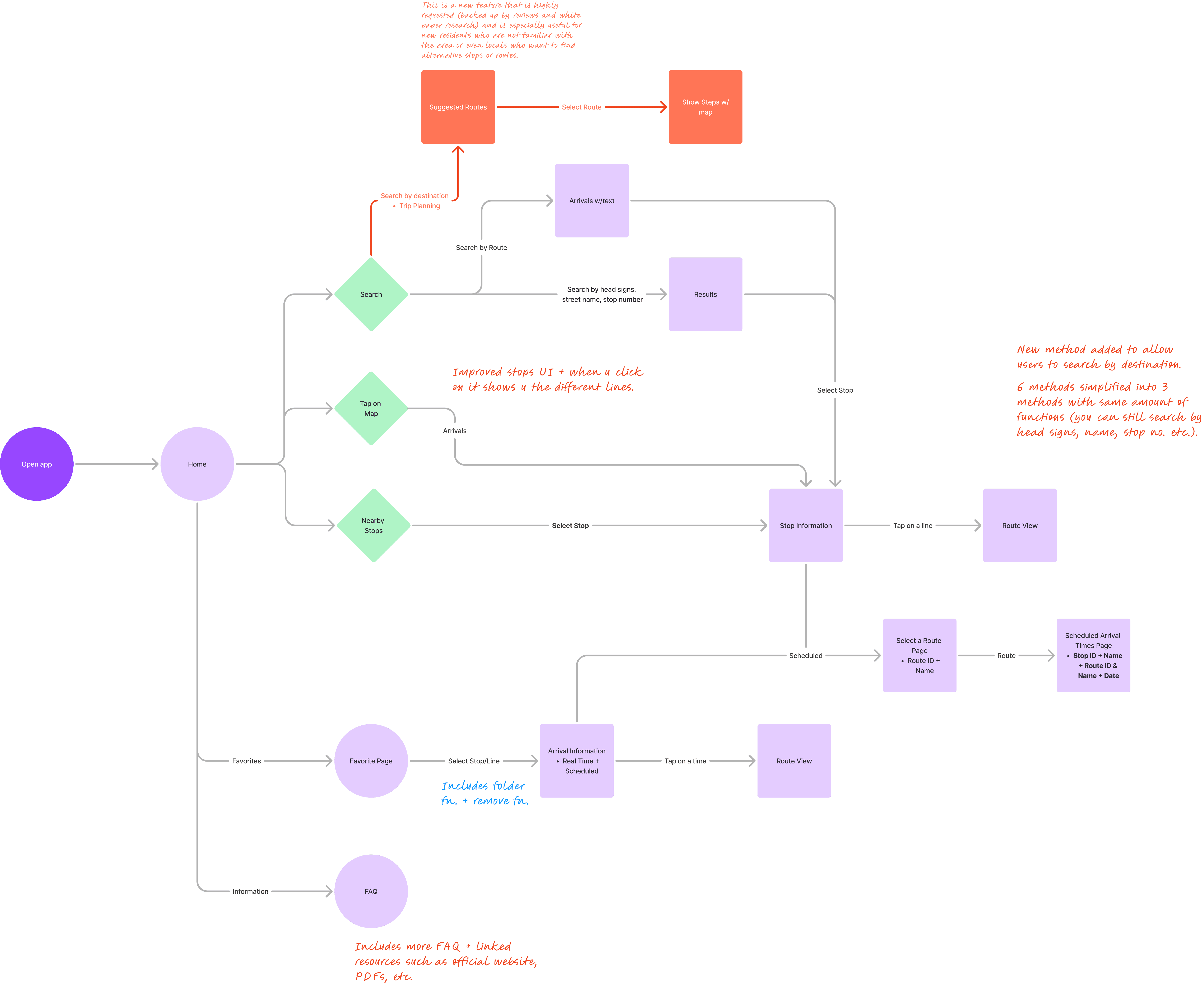
After defining the MVP, I mapped how each function would work together across the app.
PATTERN EXPLORATION
Learning from familiar transit patterns
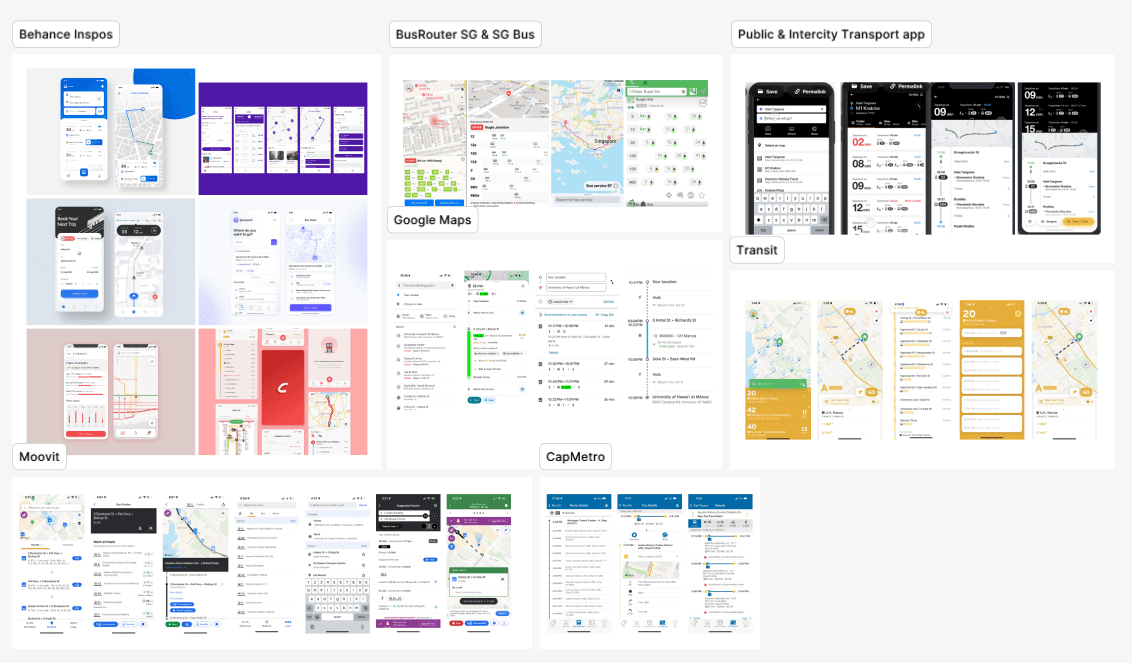
Before designing, I reviewed how existing navigation and transit apps handled the interactions on my MVP list. The goal was to find patterns riders already understood, so the redesign could preserve DaBus2’s speed and local focus while minimizing the learning curve.
All-in-one search: Google Maps and Moovit showed how one field can accept destinations, landmarks, and transit information without asking riders to pick a search type first.
Trip comparison: Google Maps, Transit, and Moovit made route options easier to compare by showing duration, transfers, walking distance, and departure time together.
Live journey guidance: Transit and Moovit offered useful patterns for departure reminders, approaching-stop alerts, and guidance during an active trip.
DESIGN ITERATIONS
Three rounds of mid-fidelity design
Version 1 — Establishing the structure
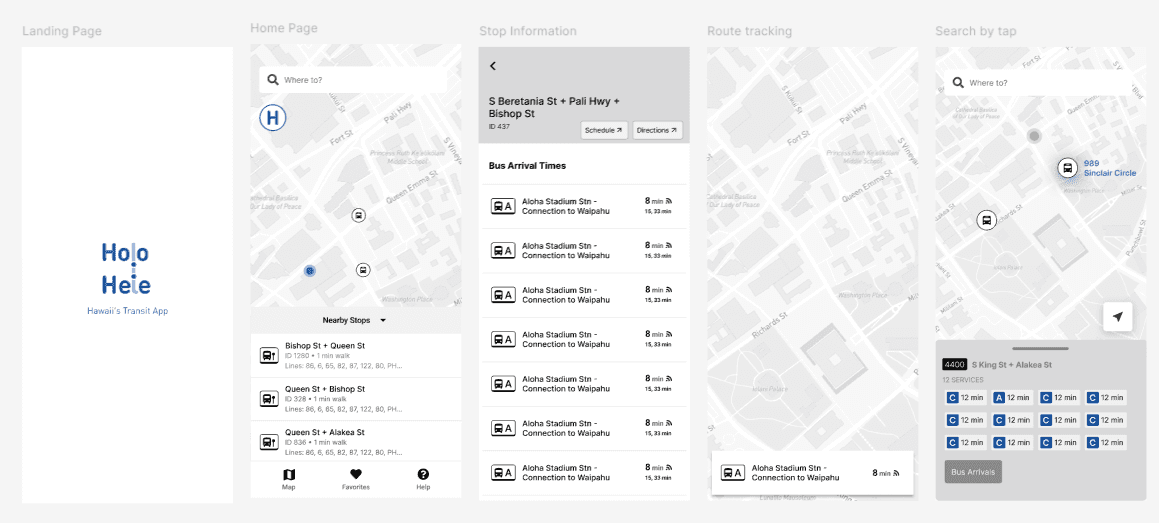
The first pass set the information architecture: how the map, routes, arrivals, and other dense content would be organized on screen, informed by the pattern review above.
Version 2 — Extending and refining
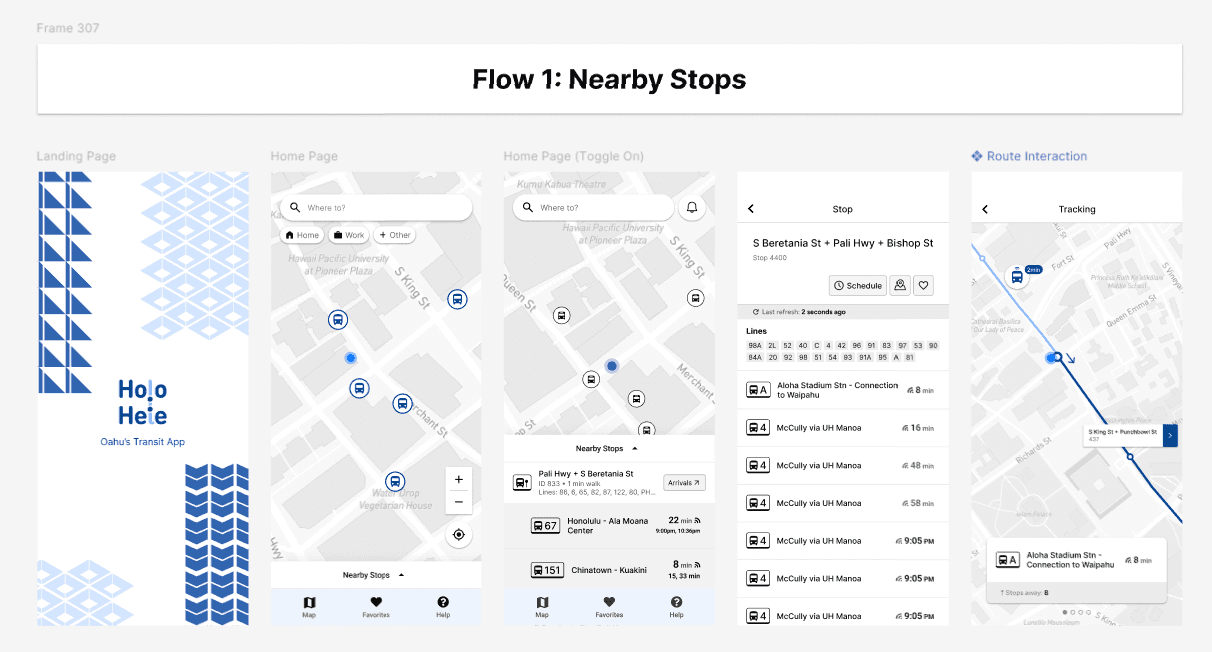
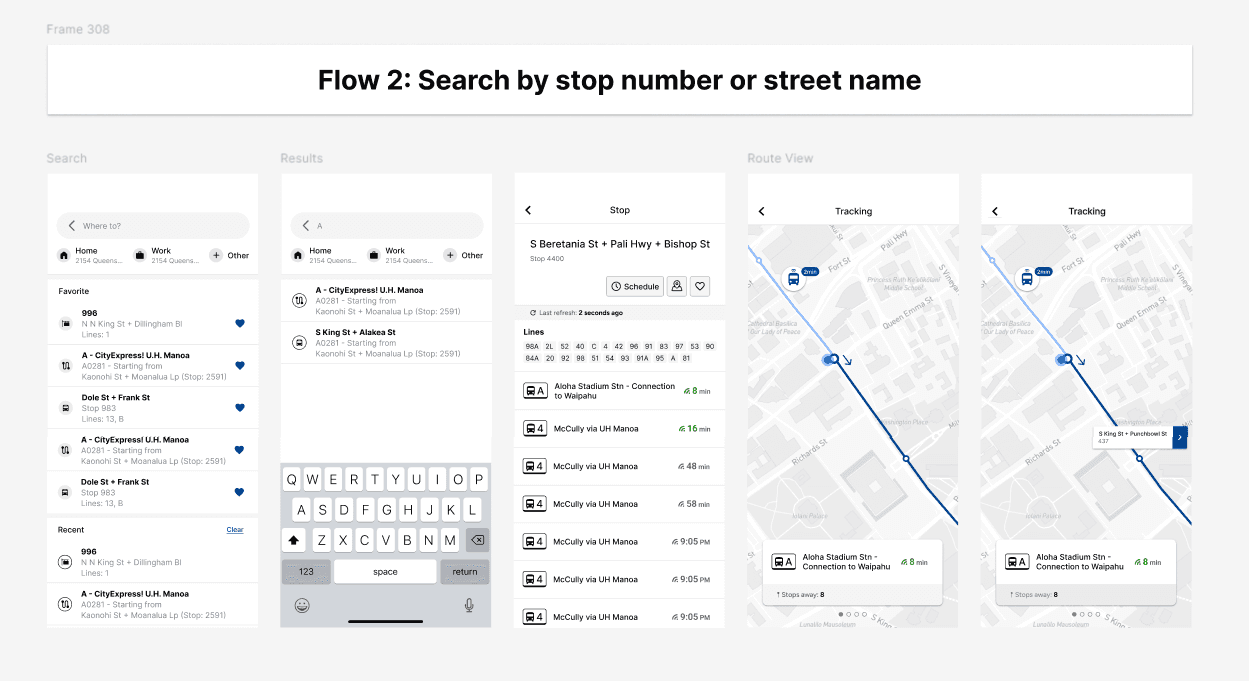
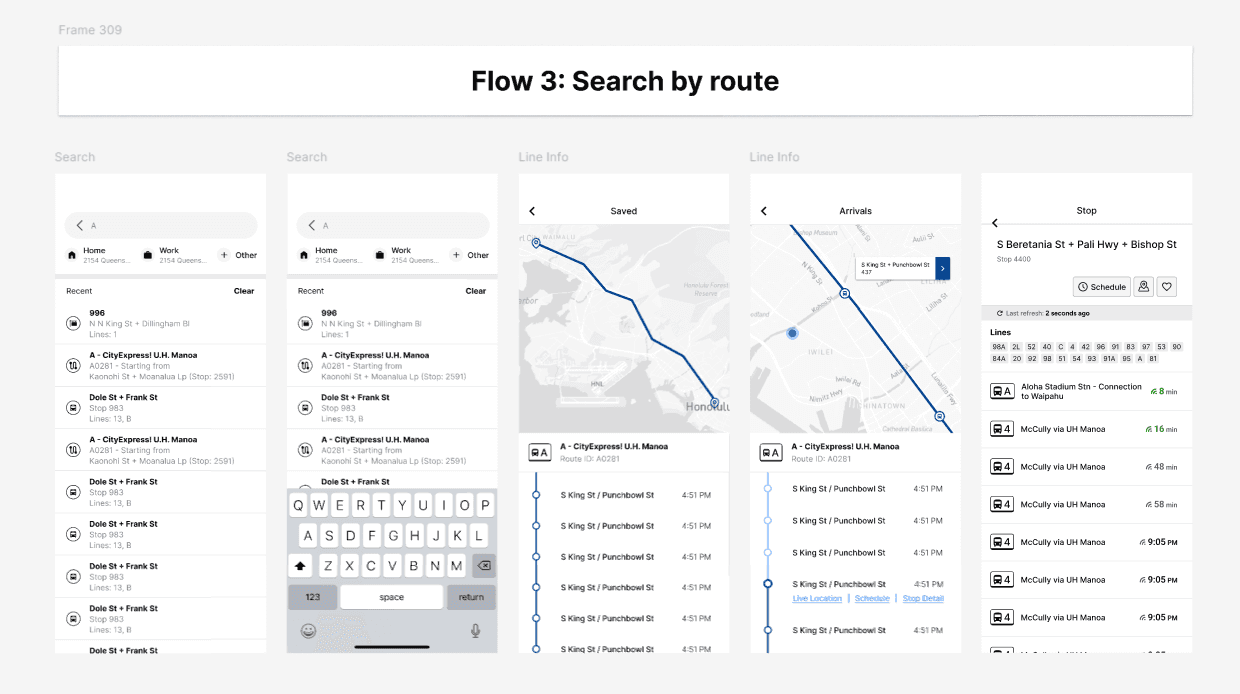
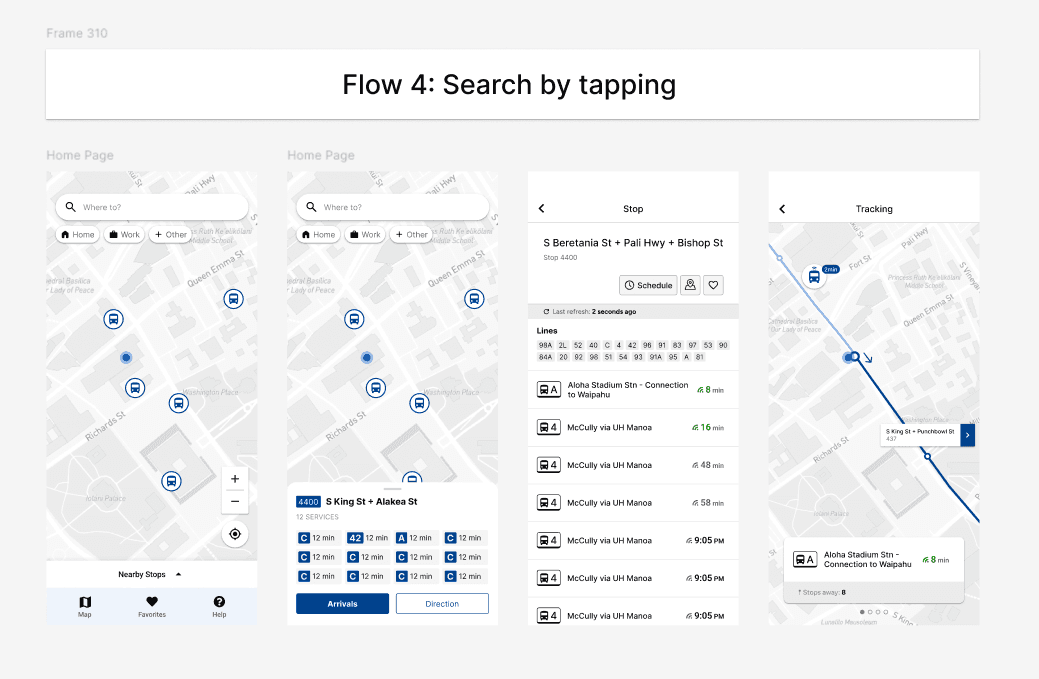
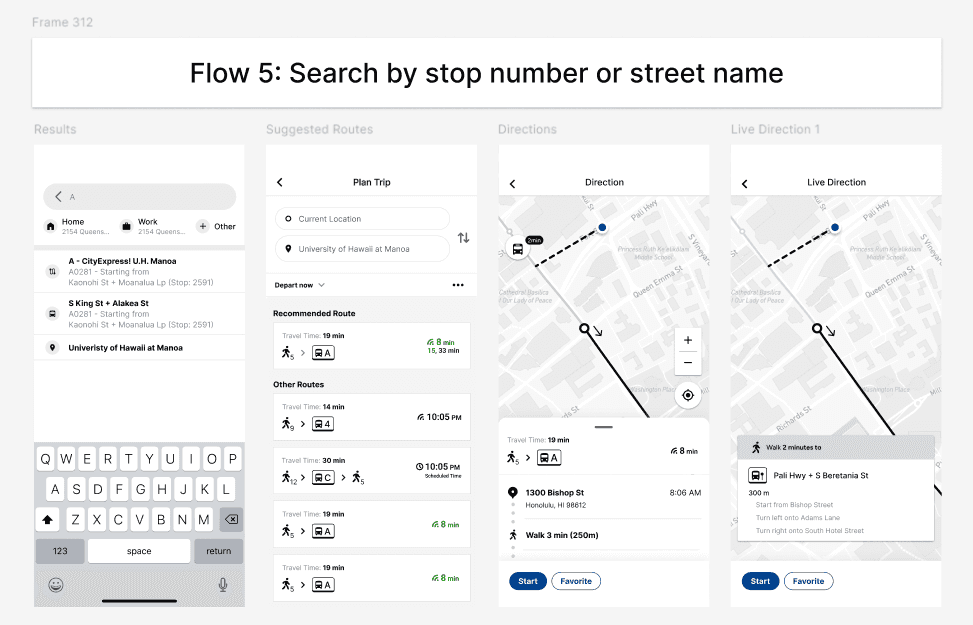
I expanded the system to cover the primary flows from the information architecture, refined the UI, and introduced early branding (primary color and logo).

Version 3 — Making it local and ready to build
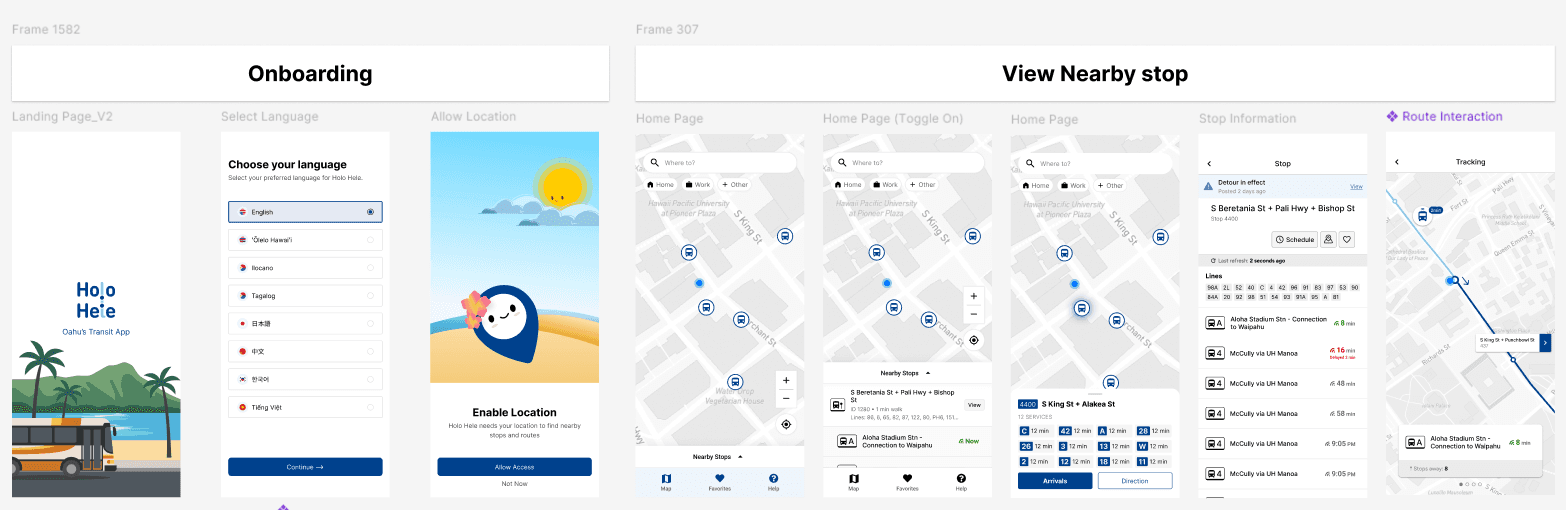
I shared Version 2 with five friends in person, walking them through the prototype on my phone. Several felt the interface could feel more connected to Hawaiʻi.
In response, I created custom local illustrations for the onboarding screens, which they preferred over the earlier Hawaiian-patterned treatment. I also reduced the use of the primary color and reorganized the components, screens, and files into a more consistent system to prepare the design for development.
FUNCTIONAL PROTOTYPE
Building with real data changed the design
I built a functional prototype with Codex and populated it with live data from TheBus API. Working with real routes, arrivals, and service information surfaced constraints that were hard to see in Figma alone.
Building clarified the scope of trip guidance
I initially designed destination search with location-aware, turn-by-turn navigation. Building the prototype exposed limits in routing infrastructure and reliable rider tracking. I narrowed the experience to walk–bus–walk guidance with expandable directions, stop progress, get-off reminders, and manual boarding and exit confirmations.


Real data changed the map markers
Connecting official data added more than 3,800 stops to the map. The first image uses sample stops; the second uses the full dataset. Most stops appear as small dots, while bus icons distinguish official transit centers.
Implementation clarified where disruptions should appear
While building the alert system, I realized disruption information should appear before riders opened a stop. I added compact alert tags to affected Favorites, helping riders notice service changes earlier and adjust their trip if needed.


Final designs and recap
REFLECTION
What I learned
Building the functional prototype showed me what static Figma screens could not. Real route and stop data changed how the map, markers, and trip details needed to be structured.
The hardest trade-off was scaling back location-aware, turn-by-turn navigation. The prototype could not track a rider accurately enough, so I redesigned the flow around expandable directions, stop progress, reminders, and buttons that let riders confirm when they boarded or exited the bus. The experience became less automatic, but more realistic and transparent about what it could promise.
If I revisited the research, I would interview a broader range of riders to validate the findings from app reviews, and to understand how needs differ across levels of transit experience.
Next steps:
Use the prototype on real trips and test the complete experience with riders. I want to find where the guidance becomes unclear, what is missing, and what it would take to make location tracking more reliable.